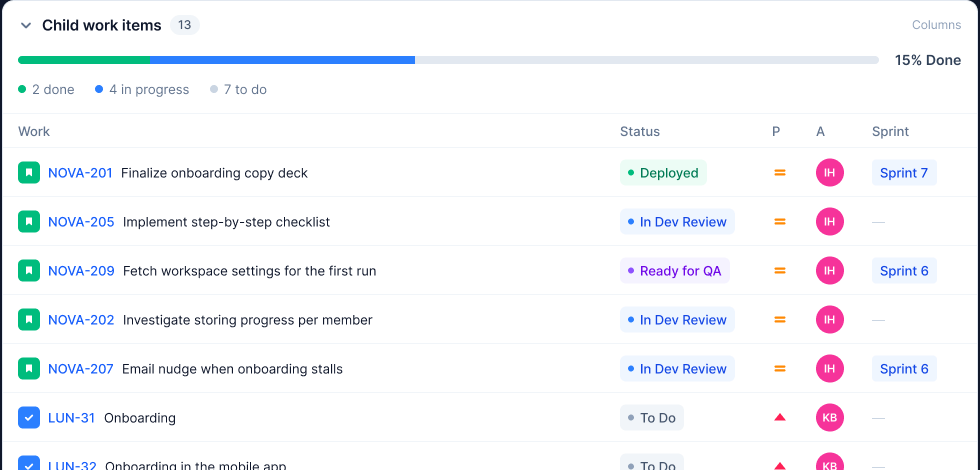
2 done
4 in progress
7 to do
Progress that adds up
Done, in progress and to do across every child — one bar and three numbers, on the epic you opened.
 AJIRA
AJIRA
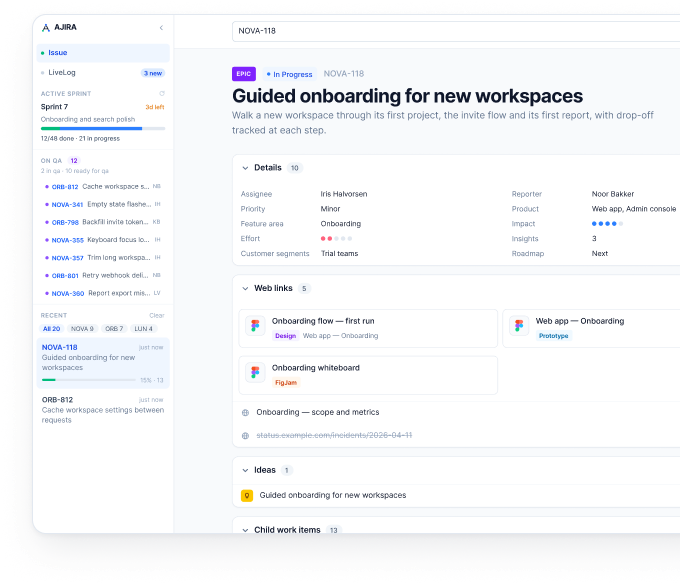
Paste an issue URL or key. Get the epic, its children, links and ideas on one readable page — with the progress rolled up and statuses you can change without leaving it.
No credentials yet? Open DEMO-42 — it renders the built-in fixture.
WHAT YOU GET
Progress that adds up
Done, in progress and to do across every child — one bar and three numbers, on the epic you opened.
Statuses change here
Pick a transition from the same page. Jira gets the update, the rollup and the QA queue follow.
9/59 done · 39 in progress
The sprint stays in view
Goal, time left and the QA queue sit in the left rail — on every issue you open.
HOW IT READS
Children, linked issues and ideas sit under the issue you opened, each on its own row. Columns hide and resize, cancelled work stays visible but struck through, and every row is a real link — cmd-click opens it in its own tab.
START
Paste a key
A full Jira URL works the same — /browse/NOVA-42, the key on its own, or a short name you saved earlier. DEMO-42 renders the built-in fixture, so it needs no credentials at all.
Run it locally
Fill JIRA_BASE_URL, JIRA_EMAIL and JIRA_API_TOKEN in .env, then open localhost:5173. The token never leaves the server — the browser only ever calls /api.